Web ticket information
No need to line up at the ticket window
Head to the slopes without contact!
With the introduction of the IC card automatic exchange machine "skiosk",
It's now even easier to collect your tickets when you arrive!
-

Purchase your lift ticket on our website.
Get the QR code! -
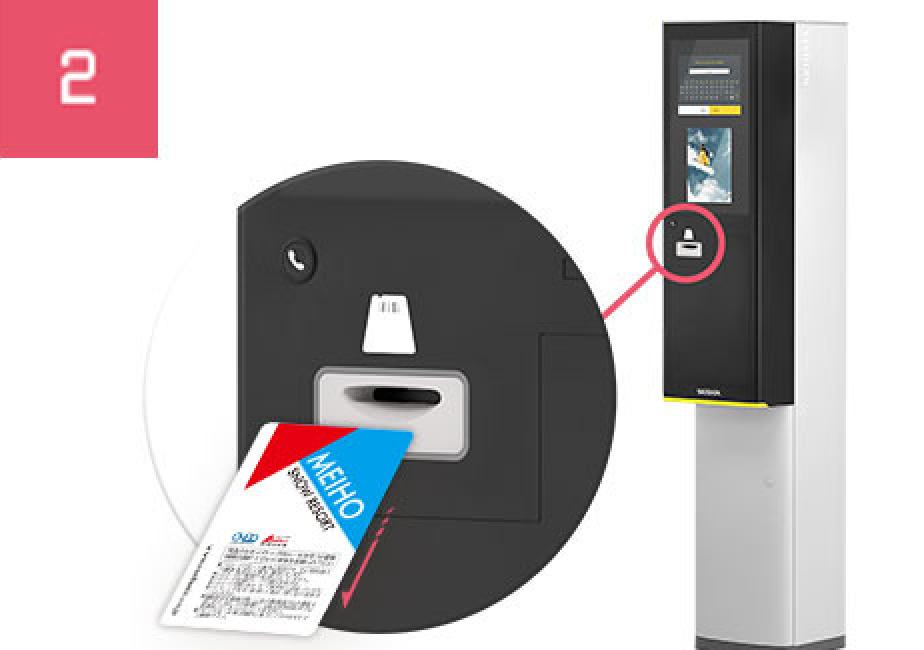
When you visit, please use the "skiosk (automatic exchange machine)"
Hold the QR code over the
Get your lift ticket! -

No need to line up at the ticket window
Go straight to the slopes!
I already purchased an IC lift ticket in advance,
No need to line up at the ticket counter
Meiho Ski Resort lift tickets are
From your smartphone or PC
You can always buy in advance for a great deal!
This will link you to the Meiho Ski Resort online ticket sales site.
*Our group company, Nippon Ski Resort Development Co., Ltd.
“Geekoutsnow” Travel Business Department
- *Please check the linked website for details and types of tickets currently on sale.
-
*Payment can only be made by credit card.
(Credit cards accepted: VISA / MASTER / JCB and their affiliated cards) - *After purchasing online, a purchase certificate with a QR code will be sent to the address you specify (PC or smartphone).
- *On the day of use, please be sure to bring the purchase certificate with the QR code that was sent to you (printed version for PC, QR image for smartphone).
- *No changes, cancellations or refunds can be made after tickets have been purchased.
- *Membership registration (free of charge) is required to purchase tickets.
Purchase procedure
-
第1步
Visit the purchase page
Please access the ticket purchase page on your PC or smartphone.
-
第2步
Select the ticket type and number
Select the tickets you would like to purchase and the number of tickets you would like to purchase.
-
步驟3
Entering buyer information
Please enter your purchaser information. If you are already a registered customer,
You can purchase after logging in. -
第4步
Credit card payment
Please agree to the terms and conditions and proceed with credit card payment.
Payment is only accepted by credit card.
(Accepted cards: VISA / MASTER / JCB and affiliated cards) -
步驟5
Save the QR code when the purchase is completed
When you visit, you will need to present the QR code that will be sent to you via email after your purchase is complete.
Please present the ticket on your smartphone screen or a printed copy. It is a good idea to keep a note of the purchase number.
This will link you to the Meiho Ski Resort online ticket sales site.
*Our group company, Nippon Ski Resort Development Co., Ltd.
“Geekoutsnow” Travel Business Department
Visitor Procedures
Please scan the QR code at the skiosk (automatic exchange machine) at Meiho Ski Resort Center House to issue your ticket.
- *Please be sure to bring the proof of purchase (printed version for PC, QR code image for smartphone) that you will receive via email when your purchase is complete.
- *Please note that if you lose or forget your QR code, you may not be able to issue a lift ticket.
-
*You can take this IC ticket home with you and use it to charge your lift ticket from your next trip onwards.
From next time onwards, you can proceed directly to the gate without stopping at the "skiosk" (automatic exchange machine). -
*The IC card deposit will be refunded at the ticket counter when you return the ticket.
Please note that we cannot refund your lift ticket if it is damaged or lost.